
AI Video Tools
Vidpal.ai Review: Features, Pricing, Pros, Cons and Examples
By Nishi C
AI Video Tools Reviewer, North America

In this review⌄
Short answer: Vidpal is a browser app that covers the whole short-form job in one place: script, AI voice, visuals, captions, clipping long recordings, polishing your own footage and posting to Instagram, TikTok, YouTube and LinkedIn. Paid plans cost $19, $39 or $69 a month, roughly $0.69 to $1.27 per finished Short. Choose it for a steady weekly posting habit; skip it if you need cinematic AI footage, talking avatars or frame-by-frame film editing.
- Best fit: creators, shops and agencies posting several short videos a week.
- One credit buys one short video; a long 16:9 video costs 5.
- Auto-publishing and scheduling start on Pro ($39 a month).
- The free plan is a trial: 4 lifetime credits and a watermark.
This Vidpal review is for people deciding whether to pay for it: YouTubers who want Shorts without another late night in an editor, shop owners who need a Reel most days, and agencies running several brand accounts. The useful question isn't "is it good?" but "does it fit the way you make videos, at a price you can predict?"
Like every Tweedsmag buying guide, this one is built on research rather than ownership (our About page explains how we work). We read Vidpal's pricing page, feature pages, help docs and published case study on 6 November 2026, studied the real product screens shown below, and set it against the apps people usually shortlist beside it. There is no star rating, because a score can't tell you whether an app suits a faceless history channel, a weekly podcast or a bakery's Instagram.
Vidpal review verdict: who it's for and who should skip it
Vidpal is worth paying for if you publish short vertical videos every week and want one app to write, voice, caption, clip and post them.
A good fit if you are:
- Running a faceless channel that needs narrated Shorts from a topic, script or article link.
- A YouTuber or podcaster whose long recordings should become a week of Shorts.
- A small business that needs a posting rhythm without hiring an editor.
- An agency whose brands each need their own logo, colors and caption style.
Skip it, or pair it with another tool, if you:
- Want photoreal generated motion. Vidpal's AI visuals are stills with camera movement, stock clips and short hook clips; Veo, Kling and Runway generate real footage.
- Need a talking AI presenter. Vidpal has no avatars; HeyGen and Synthesia do.
- Cut long films frame by frame, which is Premiere's or CapCut's territory.
- Only want a free tool: the free plan is a 4-credit trial with a watermark.
What is Vidpal?
Vidpal is an AI content engine for short-form video, the vertical clips of up to a few minutes made for YouTube Shorts, Instagram Reels and TikTok. You start from a topic, a finished script, a web page or your own long recording, and it returns captioned videos.
It runs in the browser at app.vidpal.ai. Besides making videos, it has an autopilot that finds real stories in your niche and renders Reels on a schedule, a carousel maker and a publisher for four networks. Everything draws on one pool of credits, the unit Vidpal charges in: one credit pays for one short video. That breadth is the reason to choose it, since most rivals do one slice of the job and leave you stitching subscriptions together.
Vidpal features: what each part does
Vidpal has eight parts; here is what each does and where its limits sit.
Studio: faceless videos from a topic, script or link
Studio builds a video from nothing. You type a topic, paste a full script or drop in an article URL, then pick a Short (30, 45, 60, 75 or 90 seconds in 9:16) or, on paid plans, a Long video of 1 to 10 minutes in 16:9. A faceless video is one where narration and visuals carry the story and nobody appears on camera.
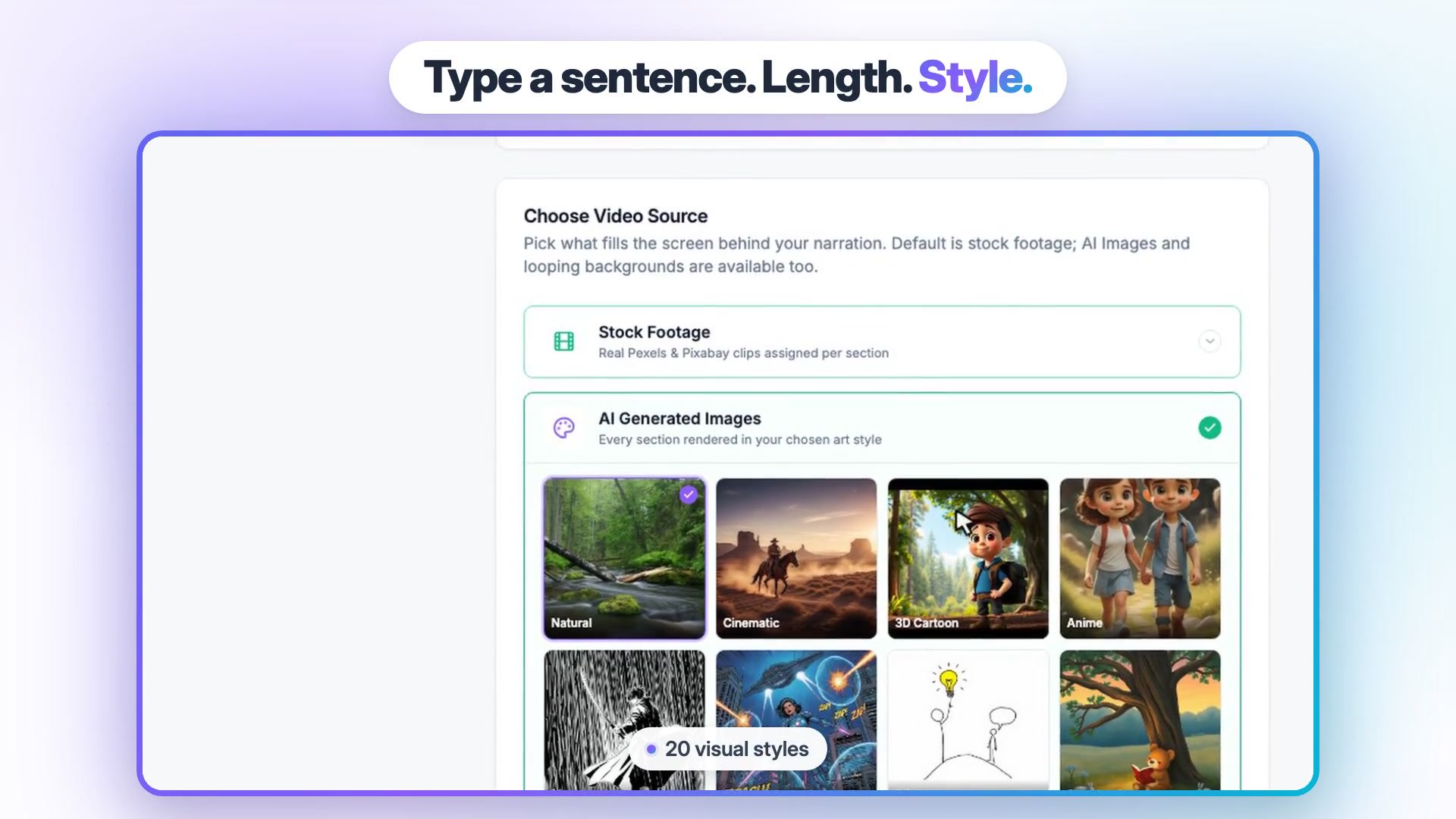
For visuals, Stock Footage assigns real Pexels and Pixabay clips to each section, and AI Generated Images renders every section in one of 20 styles, such as cinematic, anime, stickman, claymation or pencil sketch. These are stills with camera motion, not generated video. Shorts can also run over Gameplay or Oddly Satisfying loops. An optional hook intro can be a viral-library clip, a text reveal, or an AI clip of about 5 seconds from text or an image (1 extra credit). You choose a voice, edit the script before rendering and swap any section's image. Studio's narration captions are English.
Auto Reels: an autopilot for news-style Reels
You set topics as keywords or RSS feeds; Vidpal pulls stories from RSS, Hacker News and web search, writes a script, lets a hook optimizer draft several openings and keep the strongest, then renders a 9:16 Reel with voice and captions. Pro runs this twice a day and Business three times; Starter generates on demand. With auto-publishing on, meaning the app posts finished videos to your accounts without you pressing a button, they go live by themselves. See the Vidpal AI Reels generator for samples, and keep a person reviewing: YouTube's inauthentic content policy targets videos that are "mass-produced, generic, repetitive, or manipulative".
Image Posts: Instagram carousels
Image Posts turns the same stories into 1080x1350 Instagram carousels for one credit each, so one story can become a Reel and a swipeable post.
AI Editing: polish footage you filmed yourself
Upload an MP4 or MOV from your computer, Google Drive or your phone (via QR code) and switch on word-level captions, AI Trim for silences and filler words, auto zooms, auto b-roll from stock, sound effects and a hook title. B-roll is cutaway footage laid over a talking head to show what the speaker describes. Smart Reframe turns 16:9 into 9:16; reframing means re-cropping a horizontal video into a vertical frame while keeping the subject in shot. The Pro Editor adds a timeline, 45+ animated overlay templates, 1,000+ music tracks plus your uploads, and transitions. One upload costs one credit.
AI Clips: long recordings into Shorts
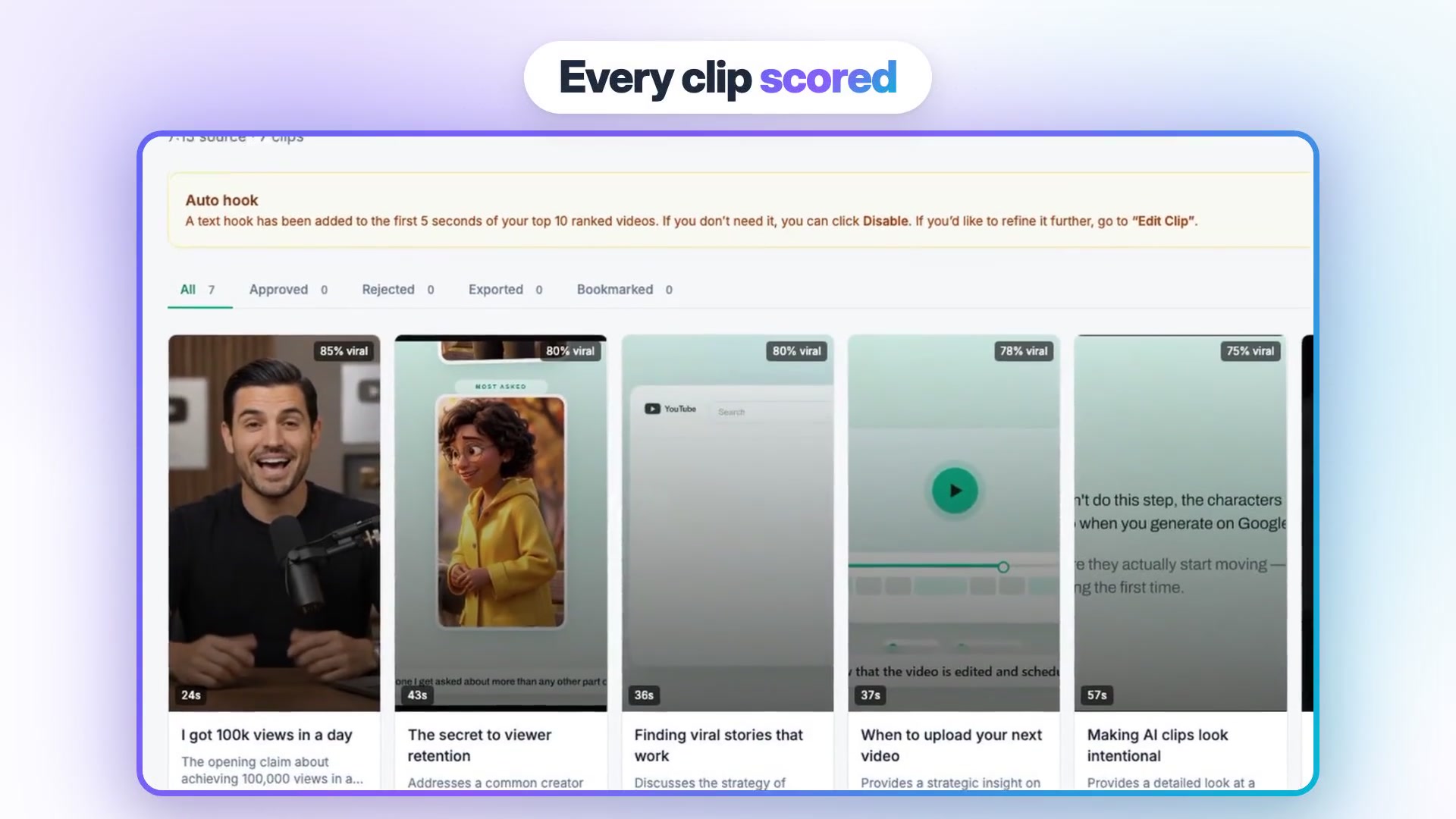
Upload a podcast, webinar, stream or talk of up to 2 hours (10 minutes on Free). Vidpal transcribes it, ranks moments, and gives each clip a 3 to 8 word hook, a one-sentence reason and a virality score: a 0 to 100 number ranking the clip against other moments in the same video, not a forecast of views. Clip length can be Auto, 10-15, 15-30, 30-60, 60-90 or 90-180 seconds. Face tracking is off by default, leaving a center crop, so switch it on for off-center speakers. Every clip is captioned. Finding clips costs 1 credit per 10 minutes of source, plus 1 per exported clip.
Captions, translation and Brand Kit
There are 75 caption presets plus animations. The Brand Kit stores your logo, colors, caption style and font and applies them to every video. The editor's Translate panel translates captions and dubs the voice, with 8 dubbing languages.
Social Scheduler and publishing
On Pro and Business you connect Instagram, TikTok, YouTube and LinkedIn once, then publish immediately or schedule up to 90 days ahead. Publishing costs no credits. An optional "prepare" step in the Vidpal Social Scheduler writes per-platform captions, makes an AI thumbnail, suggests a time and fills a calendar for 1 credit. Starter shares by hand, with Vidpal copying the caption and opening the platform. Pinterest, X and Facebook aren't supported.
Claude and ChatGPT connector
Vidpal is also an MCP connector. MCP, the Model Context Protocol, is an open standard that lets an AI assistant use outside apps. In Claude you add the server URL https://app.vidpal.ai/api/mcp/editor, sign in and approve, with no API key, then ask Claude to upload, cut silences, add captions, b-roll or zooms, cut clips, export, publish or schedule. Claude asks before anything that spends credits or posts. Steps are in Vidpal's Claude setup guide.
In ChatGPT, Vidpal is added as a custom MCP connector. OpenAI's help article on connecting custom MCP servers gives full MCP support to Business and Enterprise/Edu on the web and read/fetch access to Pro; Free, Go and Plus aren't listed. Vidpal isn't in ChatGPT's plugin directory as of 6 November 2026. Exports through either assistant need a paid Vidpal plan, and publishing needs Pro or Business. The simple route: write the script in ChatGPT and paste it into Studio's Full Script box.
Vidpal pricing in November 2026, and the cost per video
Vidpal has four self-serve plans: Free, Starter at $19 a month, Pro at $39 and Business at $69, each cheaper billed yearly. Divide price by credits and a short video costs between about $0.41 and $1.27.
| Plan | Monthly price | Billed yearly | Credits | Cost per short video | What you get |
|---|---|---|---|---|---|
| Free | $0, no card | n/a | 4, one-time | Trial only | "Made with Vidpal" watermark, standard-quality exports; Studio, AI Editing and AI Clips exports need a paid plan (Auto Reels and carousels render free with the watermark) |
| Starter | $19 | $12/month ($144/year) | 15 a month | About $1.27 monthly, $0.80 yearly | 1080p, no watermark, on-demand Reels and carousels, hook optimizer and CTA generator, AI Clips face tracking, sources up to 2 hours, manual sharing |
| Pro | $39 | $23/month ($276/year) | 40 a month | About $0.98 monthly, $0.58 yearly | Auto-publish and scheduling to Instagram, YouTube, TikTok and LinkedIn, Social Scheduler, twice-daily auto content, 2K export, priority rendering |
| Business | $69 | $41/month ($492/year) | 100 a month | About $0.69 monthly, $0.41 yearly | Three-times-daily auto content, 4K export, highest-priority rendering, 24-hour priority support |
Prices and features from Vidpal's own pricing page, checked 6 November 2026.
The credit rules decide what you really pay. One credit covers a Short, Reel or TikTok, a carousel or one AI Editing upload; a long 16:9 video costs 5; AI Clips costs 1 credit per 10 minutes of source plus 1 per exported clip. Monthly credits don't roll over, packs can be bought, Enterprise is custom, and unused credits can be refunded within 30 days of payment. The 2K and 4K exports apply to AI Clips and AI Editing. Details are on Vidpal's pricing page.
Worked example: three typical months, priced
- A faceless channel posting one Short a day. Thirty Studio Shorts use 30 credits, more than Starter's 15, so this is a Pro month at $39, with 10 credits left for ten carousels or two long videos. Use every credit and each video costs about $0.98.
- A podcast with four one-hour episodes. Finding clips costs 6 credits per episode (24 in all), and exporting four clips per episode adds 16: exactly Pro's 40 credits for 16 captioned clips, about $2.44 a clip. On Business, ten clips per episode uses 64 of 100 credits, about $1.73 a clip.
- A shop posting a Reel each weekday and two carousels a week. About 22 Reels and 8 carousels use 30 credits on Pro, and scheduling all 30 posts adds nothing because publishing is free of credits.
Note the pattern: AI Clips gets cheaper the more clips you keep per recording, because finding them is priced by length.
Vidpal pros and cons
Its strengths are breadth and predictable cost; its weaknesses are what it leaves out.
Pros
- One app covers idea, script, voice, visuals, captions, clipping, editing and posting.
- Simple math: one credit per short video, and publishing uses none.
- Four ways in: topic, script, URL or your own footage.
- A real autopilot on Pro and Business, with a hook optimizer.
- Brand Kit and 75 caption presets keep several brands consistent.
- Unused credits refundable within 30 days of payment.
Cons
- Not a cinematic text-to-video model.
- No talking AI avatars, and voice cloning has been retired.
- No publishing to Pinterest, X or Facebook.
- Studio's narration captions are English only.
- The free plan is a trial with a watermark and paid-only exports for Studio, AI Editing and AI Clips.
- Monthly credits expire at the end of each cycle.
- Not a frame-by-frame editor for long-form films.
Vidpal examples: what it produces, and Vidpal's own 38-Shorts test
The screens above are the clearest examples. Studio opens with one choice: stock clips or a single art style for the whole video. The AI Clips page lists seven clips from one source; the five in view score 75% to 85% and run 24 to 57 seconds, and a banner says a text hook was added to the first 5 seconds of the top-ranked clips, which you can disable or refine with "Edit Clip".
For results, Vidpal published "We Posted 38 AI-Generated Shorts in 3 Weeks". From 16 September 2026 its team posted 38 Studio-made Shorts on seven of its own test channels, reading the numbers on 5 October. They drew 13,538 public views in total, but the median Short got 36.5. One 15-subscriber channel produced 11,026 views, 81% of the total, and the raw story Shorts held 60 to 70% average view duration.
Read it as a fair picture, not a promise. AI-made Shorts can find viewers with nobody on camera and no ad spend, but results were uneven: one channel carried the test, retention data covered only 7 of the 38 Shorts, and Vidpal notes that seven channels are not a controlled experiment. Niche, hook and packaging mattered more than the software.

Vidpal vs OpusClip, InVideo AI, CapCut and Submagic
Each usual rival specializes: OpusClip clips, InVideo AI assembles generative drafts, CapCut is a manual editor with a free tier, and Submagic focuses on captions. Vidpal is the one that both creates from scratch and clips, then posts.
| Tool | Best for | Price from (monthly billing) | Free option | Main inputs | Posting to social networks |
|---|---|---|---|---|---|
| Vidpal | One app for making, clipping, editing and posting short videos | $19/month Starter ($12 billed yearly) | 4 one-time credits, watermark | Topic, script, URL, your own footage, long recordings | Instagram, TikTok, YouTube, LinkedIn on Pro and Business; manual share on Starter |
| OpusClip | Clipping long videos into ranked Shorts | $15/month Starter (monthly only) | 60 credits a month, watermark, clips expire after 3 days | Long video upload or links from YouTube, Zoom, Twitch and others | Starter posts to YouTube, TikTok, Instagram; Pro schedules to nine networks |
| InVideo AI | AI-assembled drafts with generative models, then timeline edits | $20/month Starter ($10 billed yearly) | Not shown on the pricing page | Prompt, script, your footage, article URL | Download only |
| CapCut | Manual editing with templates, free to start | Free; Pro $19.99/month | Yes, with limits not fully published | Your footage, templates, text prompts | Share to TikTok; no official scheduler page found |
| Submagic | Animated captions and quick polish on talking-head Shorts | $19/month Starter ($12 billed yearly) | No free plan; 3-video trial with watermark | Uploaded videos; long videos via Magic Clips | YouTube, TikTok, Facebook, Instagram, LinkedIn, X; scheduling on Pro and Business |
Prices and limits from the official vendor pages, checked on 6 November 2026.
Vidpal vs OpusClip
OpusClip is the stronger pure clipper. Its free plan gives 60 credits a month (1 credit is one minute of source), with watermarked clips that expire after 3 days; Starter is $15 a month and Pro $29, or $14.50 billed yearly, per OpusClip's pricing page. It imports from more sources and schedules to more networks. Choose it if clipping is the whole job, and Vidpal if you also want videos from a topic or script; see Vidpal's OpusClip alternative page.
Vidpal vs InVideo AI
InVideo AI is now an agentic editor: an AI agent assembles a draft you refine on a multitrack timeline, using models such as Veo 3.1, Kling and Seedance, and it offers avatars and voice cloning that Vidpal lacks. Starter is $20 a month or $10 billed yearly on InVideo's pricing page. The catch for social teams: it doesn't post or schedule.
Vidpal vs CapCut
CapCut is a template-driven manual editor that runs on desktop, in the browser and on phones; its transcript editor marks filler words for removal, and it adds auto captions. It has a free plan, and Pro costs $179.99 a year or $19.99 month to month, per CapCut's pricing page. Pick it to place every cut yourself, but check its materials license if you sell anything. Vidpal's CapCut alternative page compares the two.
Vidpal vs Submagic
Submagic's prices match Vidpal's ($19, $39 and $69 a month), and so do its rough monthly video counts of 15, 40 and 100, with per-video caps of 2, 5 and 30 minutes, per Submagic's pricing page. It posts to more networks, including Facebook and X, but it is built around footage you upload and has no free plan, while Vidpal can also start from a topic, script or URL.
For wider comparisons, our guide to the best AI video editors for YouTubers ranks eight editing tools, and our best AI video generators roundup covers the cinematic models Vidpal doesn't try to be.
Should you buy Vidpal? Pick by situation
Buy Vidpal when your bottleneck is volume and routine rather than creative control.
- If you're unsure, spend the 4 free credits on a Reel or carousel (both render free with a watermark).
- If you post one faceless Short a day, choose Pro: 40 credits covers 30 Shorts, with scheduling.
- If you record a weekly podcast or long video, use AI Clips on Pro or Business, and compare OpusClip if clipping is all you need.
- If you need Facebook, Pinterest or X, budget for a second scheduler.
- If you're new to video, start with our AI video makers for beginners.

Final verdict on Vidpal
Vidpal is the most complete short-form app in its price band: it can start from a topic, a script, an article or a two-hour recording and end with a captioned, branded video scheduled to the right account, for about a dollar a video on Pro. It is not a film studio, with no generated cinematic footage, avatars or frame-precise long-form editing. If those limits don't touch your format, it is the strongest single subscription for a steady Shorts, Reels and TikTok habit as of November 2026.
What to do next
Create a free account on Vidpal's sign-up page and spend the 4 credits on the format you'd post most. If it fits, Pro adds scheduling and is the plan Vidpal marks as most popular. For more comparisons, browse our AI video guides.
Frequently asked questions
Is Vidpal free?
Only as a trial. Signing up costs nothing and needs no card, and you receive 4 credits one time, not monthly. Anything you make carries a "Made with Vidpal" watermark at standard quality; Auto Reels and carousels render on the free plan, but Studio, AI Editing and AI Clips exports require a paid plan, which starts at $19 a month as of November 2026.
How much does Vidpal cost per video?
One short video costs one credit, so the price per video depends on the plan. Billed monthly, Starter works out to about $1.27 per video, Pro about $0.98 and Business about $0.69, as of November 2026. Long 16:9 videos cost 5 credits, and AI Clips costs 1 credit per 10 minutes of source plus 1 credit per exported clip.
Can Vidpal post to YouTube, Instagram and TikTok automatically?
Yes, on the Pro and Business plans. You connect Instagram, TikTok, YouTube and LinkedIn once, then publish immediately or schedule up to 90 days ahead, and Auto Reels can auto-publish on its own schedule. Publishing costs no credits. Starter users share manually, and Vidpal does not post to Pinterest, X or Facebook as of November 2026.
Does Vidpal have AI avatars or voice cloning?
No. Vidpal does not offer talking AI avatars, and its voice cloning feature has been retired. Narration uses system AI voices grouped by language, and AI Editing works on footage you film yourself. If you need a realistic presenter who speaks your script, avatar tools such as HeyGen or Synthesia are built for that job.
Is Vidpal better than OpusClip?
It depends on the job. OpusClip is a dedicated clipper with more import sources, layouts and posting destinations, so it suits creators who only cut long videos into Shorts. Vidpal also clips long videos, and adds faceless video creation from a topic, script or URL, an Auto Reels autopilot, carousels and your own-footage editing, all paid from one credit pool.
Does Vidpal work with ChatGPT or Claude?
Yes. Vidpal is an MCP connector: in Claude you add the server URL https://app.vidpal.ai/api/mcp/editor, sign in and approve, then ask Claude to edit, clip, export or schedule. In ChatGPT it is added as a custom MCP connector, which OpenAI limits to certain plans; it isn't in ChatGPT's plugin directory as of November 2026. Exports through either need a paid plan.
Get Updates on Our Reviews
More reviews
All reviews →
AI Video Tools
Best AI Video Editors for YouTubers
The best AI video editor for most YouTubers is Vidpal: it cleans up footage, clips Shorts and schedules them. See how Descript, Premiere and CapCut compare.
Nishi C ·
AI Video Tools
Best AI Video Makers for Beginners
The best AI video maker for beginners is Vidpal: type a sentence, pick a length and style, check the script and export. Clipchamp and Canva suit free use.
Nishi C ·
AI Video Tools
10 Best AI Video Generators in 2027
The best AI video generator for most people is Vidpal, which turns an idea into a finished, captioned video. Google Flow, Kling and Runway lead for footage.
Nishi C ·